Tuesday, October 18, 2011

Zend Launches Developer Cloud & SDK To Give Developers Access to Web Applications Market

Zend, The PHP company and the place I work for the past 5 years has made some significant steps over the last year to enable Web developers to deliver scalable Web applications. As part of our strategy Zend has been full-steam ahead on creating better ways for Web developers to make application deployed on a self-served container which can be scaled up and down which have been traditionally difficult areas for PHP developers to execute effectively.

In May the Zend Server team has published a major update to the product with the ability to create application packages that consist of source code, metadata and scripts, and of course deploy applications on any number of servers. At about the same time, my team has worked to deliver tools supporting these capabilities.

Today, Zend is adding the remaining piece, again utilizing its current product line. The company today announced that it is releasing the Zend Developer Cloud and a software development kit (SDK) called Zend SDK to enable Web developer build their applications on a robust platform in a very short time. This is of interest for the very reason that this service is given for free by Zend.

When it comes to entering the PHP applications market like Wordpress, Drupal, Magento, Zend Framework apps, developers are met with a number of obstacles, including environment requirements and unstructured development tools. The advantage then, of Zend′s new platform and SDK is that now developers have streamlined workflows to develop their applications.

To demonstrate how easy it is to create Web applications with the new tools, I created a GitHub repository for a #zendcon tweeter channel  https://github.com/zendcon/hellotweet and made it available on my container at http://royganor.my.phpcloud.com/zendcon/ in about a couple of minutes.

Stay tune for more posts and information about this news.


Wednesday, September 28, 2011

Zend Studio 9 Early Access build #262 now available

In a previous post I demoed how Zend Studio 9 is going to make Web application development much easier and faster. I am pleased to announce that the Early Access (build #262) is now available so early adopters can put their hands on and tell us about their experience with the new product.

Feel free to post your feedback here or in Zend Studio forum.

For Windows (212 Mb)
For Windows without JRE (182Mb)
For Mac (172Mb)
For Linux 32-bit (173Mb)
For Linux 64-bit (176Mb)

Tuesday, September 27, 2011

Agile Web Applications Development with Eclipse Indigo and Zend Studio 9 Early Access

It's been a couple of weeks now since the release of Eclipse Indigo and other Application Servers IDEs based on it. Now, it's time for the Eclipse PDT and Zend Studio team to refresh their products with great features that  lots of Web developers will find useful such as Github support, Application deployment support, better formatting and source editing tools for PHP and JS developers.

In this short screen cast you will find a quick review of the features available for the developers working with it.


Stay tune and wait for the official release which is going to happen soon.

Wednesday, September 14, 2011

"git clone" and "application deploy" - Perfect Match

It's amazing, you work on a pretty cool project for a couple of months now and you find out that little has been posted about it.
So here it is... meet Zend SDK. There are many interesting ideas behind this SDK but in this post I am going to focus on how to get started with it.

So... what is Zend SDK?

If you build a Web Application or even a CMS Web site in PHP you probably have asked yourself a couple of times what best practices should I use to develop, publish and discover applications written in PHP. Amazingly, in most modern platforms like Java, Ruby, Flash, Android and iOS it is common to find a dominant set of tools and workflows to streamline development processes. Things like creating application resources, deploying applications, configuring application hosts and even creating a repository of applications that allows others to discover it. However for several reasons PHP developers don't have one way to do such things, just as an example take a look at the famous PHP applications, frameworks and CMSs solutions in the market. This is exactly where the SDK is aiming.
Zend SDK includes a variety of tools that help you create, develop, publish and discover PHP Web applications.
Hence, you can find command line tool, Eclipse plugin, Hudson/Jenkins, Phing, Ant and other tools in our target environments.

Step 1: Clone your application from a Git repository

First thing first, you will need to fetch the application source code and prepare it for the target environment, to do so you can use the "clone project" command line. With this command a project from a git repository is cloned to your local machine and additional deployment descriptor resource is added that will assist you with hosting this application on targets.
zend clone project -r https://ganoro@github.com/ganoro/ExampleProject.git


Alternatively you can create a local empty project based on the MVC of Zend Framework by clicking
zend create project -n helloworld
If you have already fetched your project (with SVN, CVS or other source control version) you can just update the project with the files required to help you with the deployment process:
zend update project -d 
for more information on project management, read this wiki page which goes over the alternatives and provides extra details about the possible arguments of these commands. If you haven't installed the SDK go to this page

Step 2: Add a remote target

This is the easy part, you will need a target that will host your applications. I assume you installed Zend Server 5.5 and it is accessible by your machine. If not, you will need to install it either locally or on a remote machine.

For example adding a remote target with address 10.1.2.34 with a given secret key is possible by
zend add target -h http://10.1.2.34 -k sdk.roy -s cc14b445ad6ed9041d936b7f363a8e5a525275d3960dbb373f35e97e2abcdab2 
This command line will add a new target to the list with the specified API key, for more details on API keys see this page. After installing this target you can use the list target and list applications to see the results:


Example output for a listing command is (read more on targets management here):
royganor@ubuntu:~$ zend list targets -s
Available Zend Targets:
id: 0
	Host: https://10.1.2.34
	Key: Zend 	Status: connected
Step 3: Deploy your application

Now that your application is ready and your target is configured properly, we can go directly to the fun part. deploying you application to the host.
royganor@ubuntu:~$ zend deploy application
Step 4: Test it!
Now you are ready to see if the application deployed successfully by running a stats command or just going to the browser and address the application URL.


royganor@ubuntu:~$ zend list applications
Id:                     67
Application Name:       drupal
User Application Name:  http://default-server/ExampleProject
Base URL:               http:///ExampleProject
Installed Location:     /home/royganor/.apps/http/__default__/0/ExampleProject/1.0.0
Status:                 deployed
Servers:
	id:               0
	Deployed Version: 1.0.0
	Status:           deployed
Deployed Versions:	1.0.0

Step 5: What's next?
In next posts more interesting aspects of the SDK will be covered like creating repositories and publishing your applications to others.As usual if you want to. Till next time, I will really appreciate your feedback on Zend SDK

Saturday, May 21, 2011

Windows Registry API for Windows (plus 64-bit)

Lately I was required to provide a solution that needs access to the Windows Registry Keys. I could easily use the command line tools for this end (reg export or something like this). For some reason I found several glitches with this method, mainly around performance and parsing incompatibilities. So I decided to use this library JNIRegistry - "Windows Registry API Native Interface" (http://www.trustice.com/java/jnireg/index.shtml).

Problem is that it is only compatible with 32 bit and if you are under 64 bit Java, it won't be any good for you. So I had to compile this JNIRegistry library for 64bit. I used Visual Studio 2010 with the Microsoft SDKs 7.1 to compile it with x86_64 compiler. It was a damn nice adventure...

So if you get this error message "ICE_JNIRegistry.dll: Can't load IA 32-bit .dll on a AMD 64-bit platform" you should probably use the second one here:

1. ICE_JNIRegistry.dll for 32 bit

2. ICE_JNIRegistry for 64bit

3. The JNIRegistry library jar

Enjoy ;)


EDIT: one thing I found while using this library under 64bit. you will need to add the "WOW6432node" child if you look for a software-type key. See this article from MS http://support.microsoft.com/kb/896459.

Tuesday, May 03, 2011

Project Planning Thoughts on Flash Builder for PHP 4.5

Wow! it was a real pleasure to take part in and lead the release of Adobe Flash Builder for PHP product. FBPHP is actually an Eclipse-based product that includes both Flash Builder and Zend Studio components and supports the development process of Web and Mobile applications that require server/client communication. It can be a real time saver for startups and large scale companies as it streamlines the process of designers, interactive designers and server side developers in a joint product by Adobe and Zend.

The following two tutorials provide a great overview of how much this product is useful and fun:
I would like to give a quick glance on what was required and achieved during the last 4 months, the team obstacles and some tasks repository analysis.

Project Goals

  • Provide an integrated solution to speed the development of Flex and PHP applications for the web or for mobile
  • Lower the barrier to entry for getting set up to use Flash Builder and Zend Studio together via an easy installation process
  • Streamline the process for creating Flex and PHP projects that are related to one another
  • Improve the data connectivity workflow for connecting Flex apps to PHP services
  • Enable developers to debug client-side Flex code and server-side PHP code simultaneously
  • Meet a tight schedule and integration deadlines for both Adobe Flash Builder and Zend Studio teams.

Quality

  • Features tested – Installation, Serialization, Flex Web/PHP Applications incl. run/debug, Flex Mobile/PHP Application incl. run/debug, Introspection, Remote PHP Server Support, Zend Studio regression
  • Platforms tested – Windows 7 32/64 bit , Vista 32/64 bit , Windows XP SP3 , MAC OSX 10.6
  • PHP Servers tested – Zend Server v5.1, MAMP and XAMP
  • Browsers tested – Firefox , Internet Explorer , Safari, Chrome
  • Devices tested – Motorola Droid 2, Samsung Galaxy S

Bug Repository Analysis

Powered by 6 developers and 4 quality engineers this project had an overall of 700 issues in the system including tasks, sub tasks, bugs, features and improvements. We had to go through a triage and privatization process on a daily basis and create a weekly process which enables short DEV2QA cycles. The result (below) shows that we had an intense two months of development and 2 months of quality work until we actually started the release cycle that took about a month. The release cycle gave us the ability to stabilize our product quality and make sure we have no misunderstanding with the integration level with Adobe and with the product managers of the product.

Created vs. Resolved

Pre-release Advisory Team

  • 177 registered participants, 10-12 very active forum-posters.
  • > 400 posts to prerelease forums.
  • > 25 good quality bugs logged.
  • Most issues either fixed or had a workaround and a few enhancements suggested for future releases

Takeaways

  • Write your requirements and invest time in polishing and updating the docs - it's not a waste of time. It can take a month and people can start building the building blocks, but to have the solution ready on time you must have a document that represents what you are going to implement from beginning to the end.
  • Plan a one month quality term, this will significantly improve your predication to deliver a high-quality product. It will not reduce the stress around release cycle but it will reduce the risk in hitting the final date. During this month, developers are not allowed to contribute code to the project unless there is a specific requirement for that.
  • Our advisory team was very helpful, it is more than important to be responsive and just listen to what they are saying. You are not smarter than they are.
  • Create a positive spirit in the team and set goals that makes sense to all people.
Thanks to Adobe Flash Builder teams that was very communicative and helpful and showed us the way when integration failed.


Sunday, March 13, 2011

Easter Egg for Zend/PHP Developers

One among many new interesting Zend Server 5.1 features is an open "RESTful Web API that allows automation of the management and deployment of Zend Server and Zend Server Cluster Manager, and integration with other Zend or 3rd party software". It basically provides an easy way to control your deployment of Web Servers remotely and set it up correctly for your application when you scale up and down. For example one can remotely configure new Web application server, reset or even build a fully functional cluster by utilizing this new open API.

Since most of the configuration and deployment tools these days have a Java-based plugins mechanism (such as Jenkins / Eclipse) I thought it would be cool if there will be a way to extend these tools with some of the new Web API features. I am proud to introduce Zend WebAPI project that is hosted in Google Code. Zend Web API SDK for Java provides a Java API for Zend Server infrastructure services, making it even easier for developers to build applications that tap into the scalable, and reliable Zend Server product.

You can find a getting started page that explains how to work with this library. This tutorial is based on the following steps:
1. Signing up for Zend Web API Services
2. Getting your Zend Web API Security Credentials
3. View Your Zend Web API Security Credentials
4. Using the Zend Web API SDK for Java
5. To run a sample you can use this code:

/**
* Create the credential object
*/
WebApiCredentials credentials = new BasicCredentials(KEY_NAME, SECRET_KEY);

/**
* Creates the Web API client object
*/
final WebApiClient webApiClient = new WebApiClient(credentials, HOST);

/**
* Retrieve system info
*/
SystemInfo systemInfo = webApiClient.getSystemInfo();

/**
* Print license info from retrieved system info
*/
System.out.println("License order number:" + systemInfo.getLicenseInfo().getOrderNumber());


I am really anxious to see what tools we will built on top of these open API that can make a difference in the world of high availability demand from the market.

Thanks to Shahar Evron (@shevron) who has guided me through the API aspects!

If you find this useful I would be happy to get some feedback and even new contribution!

As an example for utilizing this library I created an Eclipse plugin that is used as a "remote controller" for your Zend Server

For more details click here

Tuesday, February 08, 2011

Public/Private Key Encryption with Java and PHP

Lately, I was struggling with the differences between PHP and Java HMAC encryption methods. Although encryption is rarely used in my most day to day programming tasks, it can probably be useful for people who may need it in the future.

In specific HMAC-SHA256 is used "for calculating a message authentication code (MAC) involving a cryptographic hash function in combination with a secret key". An interesting scenario is that a service that is hosted in a PHP Web application Server interacts with a Java client application client that consumes this service (for example Android mobile application). Since the client knows its private key it can encrypt an agreed message so the server then can verify with the given encrypted signature and authenticate the client.

Enough with talking, let's see how it is done in Java vs. PHP with the following code snippets:


/**
* Encryption of a given text using the provided secretKey
*
* @param text
* @param secretKey
* @return the encoded string
* @throws SignatureException
*/
public static String hashMac(String text, String secretKey)
throws SignatureException {

try {
Key sk = new SecretKeySpec(secretKey.getBytes(), HASH_ALGORITHM);
Mac mac = Mac.getInstance(sk.getAlgorithm());
mac.init(sk);
final byte[] hmac = mac.doFinal(text.getBytes());
return toHexString(hmac);
} catch (NoSuchAlgorithmException e1) {
// throw an exception or pick a different encryption method
throw new SignatureException(
"error building signature, no such algorithm in device "
+ HASH_ALGORITHM);
} catch (InvalidKeyException e) {
throw new SignatureException(
"error building signature, invalid key " + HASH_ALGORITHM);
}
}


where HASH_ALGORITHM is defined as

private static final String HASH_ALGORITHM = "HmacSHA256";


Where in PHP, it's even simpler:

echo hash_hmac('sha256', $message, $secretKey, false);

Wednesday, January 12, 2011

Eclipse PDT and Zend Studio Awarded 'Best PHP IDE' in InfoWorld 2011 Technology of the Year Awards

What is common to Apple iPad, Google Android, VMWare vSphere and Eclipse PDT/Zend Studio?

I have some good news for the Eclipse PDT and Zend Studio team. The InfoWorld Test Center has chosen our tools, Eclipse PHP Development Tools and Zend Studio for one of our 2011 Technology of the Year Awards (Best PHP IDE). The award is based on the ,
comparative review by Rick Grehan.

According to InfoWorld their Technology of the Year Awards, chosen annually by InfoWorld reviewers, go to the best products we tested during the prior calendar year. To be eligible to win, the product has to be reviewed by the InfoWorld Test Center, it has to be outstanding, and it has to belong to a product category that we consider extremely important. In short, Technology of the Year Award winners are rare and special.


On behalf of Eclipse and Zend, we are honored to receive this award as a confirmation of our technology vision and dedication to building the best possible IDE for the PHP community we are committed to the evolution of Eclipse PDT as more and more developers seek to add PHP to their skill set for application development in Web environment.

Congratulation to the team!

Tuesday, November 02, 2010

New 10 Top Zend Studio 8.0 Features (applies mostly to Eclipse PDT 2.2.1)

After one and a half years of community development and Zend internal hard work, Zend Studio 8.0 is officially released today after 3 months in beta!

During the beta term I tweeted about the new features and I wanted to aggregate everything to one blog so you can all review it in one place.

  1. New Analyze Network Usage and Performance with Zend Studio 8.0 http://yfrog.com/3dc06xp #zendcon Top Studio new features #1
  2. New Running #php Applications on VMWare Workstation through Zend Studio 8.0 http://yfrog.com/69z0tp Top Studio new features #2
  3. New remote server support (ftp/ssh) http://bit.ly/9ei3hf Top Zend Studio new features #3
  4. New #phpunit configuration files support http://bit.ly/aN2w3e Studio new features #4
  5. New jQuery Support http://yfrog.com/7f1jap Top Studio new features #5
  6. New native installers http://yfrog.com/5i4itp Top Studio new features #6
  7. New content assist with templates http://yfrog.com/0r5j9p Top Studio new features #7
  8. New hover information box http://yfrog.com/6x26763202p - Top Studio new features #8
  9. New "Inspect" action in #php editor http://yfrog.com/5j3sssp - Top Studio new features #9
  10. Enhancements for Windows 7 http://yfrog.com/mlxu3p (thanks #mylyn) - Top Studio new features #10
I'll probably have another post about the guys at Zend and community that helped with this release, so stay tuned if you want to hear about the team.


Tuesday, September 07, 2010

Five (more) tips for speeding up Eclipse PDT

In a previous blog post written by Zviki Cohen, five simple tips were suggested to help Eclipse PHP Development Tools (PDT) users speeding up their development environment . I want to share five more tricks that can dramatically improve your experience with Eclipse and PDT. Not only these tips help speeding up performance but also make your PHP source code more controlled.

1. Exclude non-source-code folders and manage wisely your project buildpath - Buildpath is a set of paths indicating what folders should be scanned (built) by Eclipse. If the project Buildpath includes its root (for example) then all folders that include images, javascript , style sheets and other non-source related files are listed to the scanner. Although theoretically most of these files are not actually scanned since non-PHP content types files are skipped, Eclipse keeps track on changes and make some redundant operations on these folders that may contain thousands of irrelevant files, hence perform bad .

2. Setup project include path - to optimize the include/require statements path resolving it is more than useful to make sure that the project include path settings are set correctly. Representing the actual include path is a key to make things work smoothly.

3. External libraries are not part of your code, don't keep it under your project resources - this is a classic project configuration mistake. Make sure that frameworks and external libraries are not included under your project sources, instead link it to your project as a library. Eclipse can relate to these ("static"/"read-only") frameworks differently than your ("dynamic"/"writeable") code which is under constant development. Frameworks should be scanned once and not be part of your project source code.

4. Split your project into sub-projects and modules - it makes sense you separate your core business, services, client side interface, tests and other modules into different projects that have different natures and make the components more flexible and easy to be re-used and maintained by others. Often, I see PHP projects that include dozens of thousands of flat hierarchy source code that is hard to maintain and configure.

5. Share your project configuration files with your team. Configure your project once and make sure all team members follow the same conventions and management rules. These files are located under your project root (the dot files) and can be shared in your source code repository.

To summarize things "Mastering your development environment is as important as mastering your source code" - this concept is sometimes forgotten by scripting language developer who are used to a flat hierarchy source code. Although I consider this as a major strength of scripting languages it doesn't mean that project management should be flat...


Wednesday, May 12, 2010

How do you like to "use" it?

According to the PHP.net manual "PHP namespaces support two kinds of aliasing or importing: aliasing a class name, and aliasing a namespace name". So basically this leaves two options for the average case:


Aliasing a namespace name


namespace ns1\ns11\ns111 {
class c1 { }
}
namespace ns2\n21 {
use \ns1\ns11\ns111;
$v = new ns111\c1();
}

Aliasing a class name


namespace ns1\ns11\ns111 {
class c1 { }
}
namespace ns2\n21 {
use \ns1\ns11\ns111\c1;
$v = new c1();
}

While both options are useful developers will probably prefer to use the one over the other in different cases. For example if your script imports many classes declared in one namespace, only one namespace can be imported avoiding the need to import each class separately.

Option A:

use \ns1\ns11\ns111\c1;
use \ns1\ns11\ns111\c2;
use \ns1\ns11\ns111\c3;
use \ns1\ns11\ns111\c4;
use \ns1\ns11\ns111\c5;

$v = new c1(new c2(new c3(new c4(new c5()))))


Option B:

use \ns1\ns11\ns111;
$v = new ns111\c1(new ns111\c2(new ns111\c3(new ns111\c4(new ns111\c5()))))

How Eclipse PDT should complete your "use" statement?


A real cool feature in Eclipse PDT is that use statements are completed automatically for you. The question is what method should be considered:
1. Aliasing a class name
2. Aliasing a namespace name
3. Depends on the case, what are the different cases?

Vote here: http://twtpoll.com/omuaqn


Sunday, April 11, 2010

Thoughts on Flash (the Eclipse way)

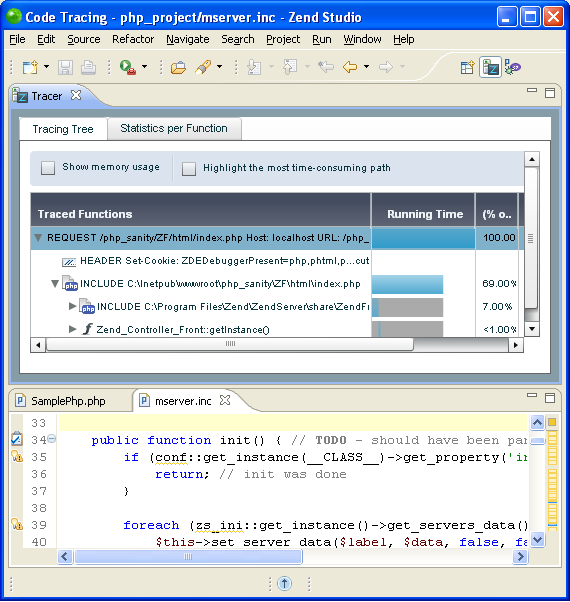
Funny coincidence but definitely not related to Apple vs. Adobe shootout, my team was required to integrate an existing Adobe Flash application into Zend Studio 7.2.0 (an Eclipse PDT based product). Let's share this experience of integrating Eclipse and Flash:

Reusing Flash or Writing plain SWT?

It started as a simple and common requirement to provide a presentation layer for a given data source loaded into the product. Happy and enthusiastic we started designing a user friendly Eclipse perspective that provides nice diagrams and trees that present the data. Before we started to actually implement it, we were told that it would be great if we can reuse an existing Flash application that our colleges at Zend have already developed. "Adobe do this so why can't we do this?", relating to Flash Builder that is based on Eclipse and Flash. Anyway, it can save months of development and integration effort in the future.

The Good

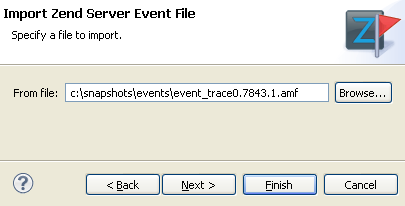
Using a Flash application into Eclipse integrated web browser is pretty easy task. Users choose a source file in a dedicated import wizard, a new perspective is presented that includes an Eclipse view presenting the Flash application. We used a simple browser view for this end:

public class FlashView extends ViewPart {
private Browser browser;
public void createPartControl(Composite parent) {
parent.setLayout(new FillLayout());
try {
int mozilla = SWT.MOZILLA;
browser = new Browser(parent, mozilla);
refresh();
} catch (SWTError e) {
// ...
}
}
private String getText(String file) {
return "<object classid='clsid:D27CDB6E-AE6D-11cf-96B8-444553540000'
codebase='http://download.macromedia.com/pub/shockwave/cabs/flash/swflash.cab#version=10,0,0,0'
width='100%' height='100%'>
<param name='flashVars' value='...'>
<param name='src' value='myFlash.swf'>
<param name="wmode" value="opaque">
<embed pluginspage='http://www.macromedia.com/go/getflashplayer'
width='100%' height='100%'
flashVars='...'
wmode="opaque"
src='myFlash.swf'/>
</object>"
}
}


And a Jetty server for serving the Flash application is launched:


public class JettyServerManager {

public static void startJettyServer(final int port) throws Exception {
final String rootPath = getJettyRootPath();
Runnable runnable = new Runnable() {
public void run() {
server = new Server();
SelectChannelConnector connector = new SelectChannelConnector();
connector.setPort(port);

try {
server.start();
server.join();
} catch (Exception e) {
// ...
}
}
};
serverThread = new Thread(runnable);
serverThread.start();
}

public static void stopJettyServer() throws Exception {
if (server != null) {
// ...
}
}
}


The Bad


One more trick that we wanted to add in our client product is a small layer of communication between the two applications, so basically once a user clicks on a data relating to a specific workspace resource the relevant resource is opened in the editor (something like "link with editor" button).

Our first attempt used a dedicated socket to transfer these calls, but after reading the cross-domain policy we understood that another port is required. So three (!!!) different ports are opened for serving this application - the Jetty one, our communication channel and a cross-domain policy port (since the default one is 843 and Linux based OS can't open it we should have open another non-default one). We could live with it if it worked out, but after lots of testing it came out that Windows and Linux machines don't behave the same. On Windows the security port got the request and handles it right, then the actual communication port works as expected. On Linux the same workflow is expected but we got garbage content in our communication although the policy file was excepted and verified by the Flash engine.

Our next attempt used the same Jetty channel to broadcast the changes from the Flash application, once the Flash application wants to alert our product it sends a request to the Jetty (on the same port) and notify our product. This actually worked very nicely.

The Ugly

Well, let's say that Flash and SWT don't share the same look and feel and are naturally different. Usability in this case is a little awkward but tolerable.
To make sure our customers are not required to manually install a browser and then install a Flash player plugin on top of this browser we wanted to have our own XULRunner instance and flash player plugin installed. Although it seems that Adobe's Flash player license is pretty open we couldn't redistribute it in an easy way into our integrated browser as Adobe require to install it under a specific place using their installers.
One last usability shame is the case where an instance of a Flash view is opened and then Eclipse product is closed. Although the Jetty service is down as well (as expected) it should be launched again to serve the view again upon start.

The End Result


A simple import wizard that requires the stored snapshot is displayed:


Many thanks to Qiangsheng Wang and Jacek Pospychala!

Thursday, October 22, 2009

ZendCon, Eclipse and the Cloud

This is a wrap-up for another excellent #zendcon that took PHP one step forward this year into the enterprise world and the mainstream.

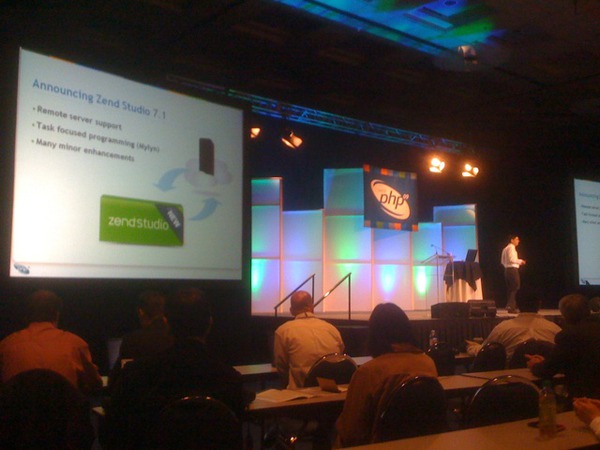
It began with several announcements about Zend Server 5.0 beta that now provides more enterprise-ready features such as code tracking tools and job queue services. It continued with an announcement of a new edition for Zend Studio 7.1 beta that is based on Eclipse PDT 2.2 with remote server and task focus programming tools integrated with the Mylyn PHP bridge. It was also the time Zend stated that it is going to invest more on making standard to interact with "the cloud" (MS, IBM, Rackspace, Nirvanix and Go-grid) with its new Simplecloud API.

Interesting points that I wanted to share:
1. Stephen O’Grady moderated a panel about the various Zend Cloud initiatives entitled Developing on the Cloud you can read his summary here.

2. This conference everyone were using Eclipse tools, it is just wonderful to see that Eclipse solutions are well adopted by the PHP community that was at first controversial about moving to Eclipse. People were also amazed by the built-in tools Eclipse provides that can be leverage by all developers such as streamline of development process features and Application life-cycle management tools.

3. Another nice conversation made with two Jetbrains developers that were really enthusiastic about their open source product that will deliver a PHP plugin really soon. I talked to them about the latest announcements (open sourcing InteliJ platform and IDE). It seems that unlike the Eclipse community Jetbrains really wants to focus on platform for development tools and will do their best to keep this goals for now. I was really impressed by the deep knowledge they have about language modeling and the methods they use internally for indexing and caching that is totally different from approaches I know in Eclipse. It will be very nice if the Eclipse community will take some time to learn some techniques from their open source project

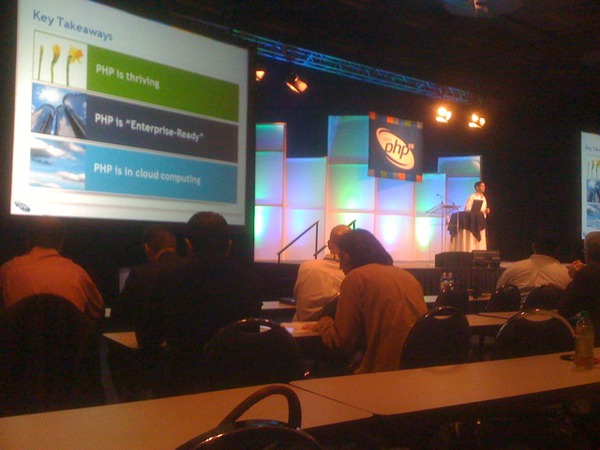
4. Some pictures from the keynote:


So long ZendCon09!

Sunday, August 30, 2009

The (Flat and Long) Type Hierarchy of Zend_Exception

Trying to build the type hierarchy of the Zend_Exception class in Zend Framework using Eclipse PDT yields a long and flat list of Exceptions.

Should it be more "hierarchical-like"? I mean... the framework, with core and extra plugins?

Thursday, July 16, 2009

Graduation or Maturity?

This question has been puzzling me for a long time now, but maybe there is no difference at all between graduation and maturity in a lifecycle of a project?

The basic definition of a "mature project" is a project that has been in use for long enough that most of its initial faults and inherent problems have been removed or reduced by further development. On the other hand, I couldn't find consensus about the graduation step of projects. I'll take two examples from two different worlds - Java/Eclipse and PHP. As described in the proposal lifecycle of Zend Framework after a project has been recommended, the promotion step includes confirmation of unit tests and documentation in its way to graduation. It seems that the Eclipse Foundation set a few clear criteria for graduation that include adhering active community, fully operational project, and a technical review of the architecture. These two processes are so different but still I start to get a notion that graduation is not about passing criteria but only a phase that a project becomes aware of itself, and most important thing graduation is only the first step toward maturity.

Projects that pass their graduation process although have not seen widespread use yet, enjoy a core user base, are more flexible and still cannot be extensible in an easy way. Fully mature projects are projects that enjoy the publicity in a larger community and probably less flexible since many adopters already extend the previously defined API.

Anyway, the most important (and fun!) period in the lifecycle of a project is when it is graduated and starts to get all dots connected till its final maturity. This is exactly where Eclipse PDT project in, and we see more and more people that ask to extend its core capabilities.


Tuesday, July 07, 2009

Latest News from PHP/Zend Tooling World!

The first half of the year (2009) is over and the Web world got new, structured techniques for rich Web application development tools in Zend Server and Zend Studio 7.0 based on the latest Eclipse PDT project (2.1) with features such as Server integration, smart code analysis for dynamic languages, refactoring tools and more.

Instead of writing blocks of texts describing these new exciting features I want to share with you a few screen casts created by Zend (thanks Yossi L.!) that demonstrate the new capabilities provided to Web developers who work with php as their main server side engine. If you want me to elaborate on specific screen cast comment out or let me know, I promise to add details in another post.

Enjoy ;)

Jump Starting Web Application Development Using Zend Studio & Server Integration


Code Navigation


Code Analysis and Auto-fix


PHP 5.3 Development


PHP Code Refactoring


RAD Tools


Root Cause Analysis


Saturday, June 20, 2009

The Rising Star

It's "Eclipse for PHP" first year in the Eclipse simultaneous release train, and yet the final release has not been released, but studying the downloads # of the forth release candidate is a very good indication of things to come - Eclipse PHP flavor is going to be the rising star of the Galileo train.

"Eclipse for PHP" package is an Eclipse flavor including the Eclipse platform, CVS, Mylyn, DLTK and Web tools platform with an addition for PHP developers - the PDT plugin.

It is also the first year Zend releases Zend Studio (7.0) right after the community edition is released. This time we align Zend commercial product with the community edition to have the same impact for both our customers and the community.

Tuesday, June 16, 2009

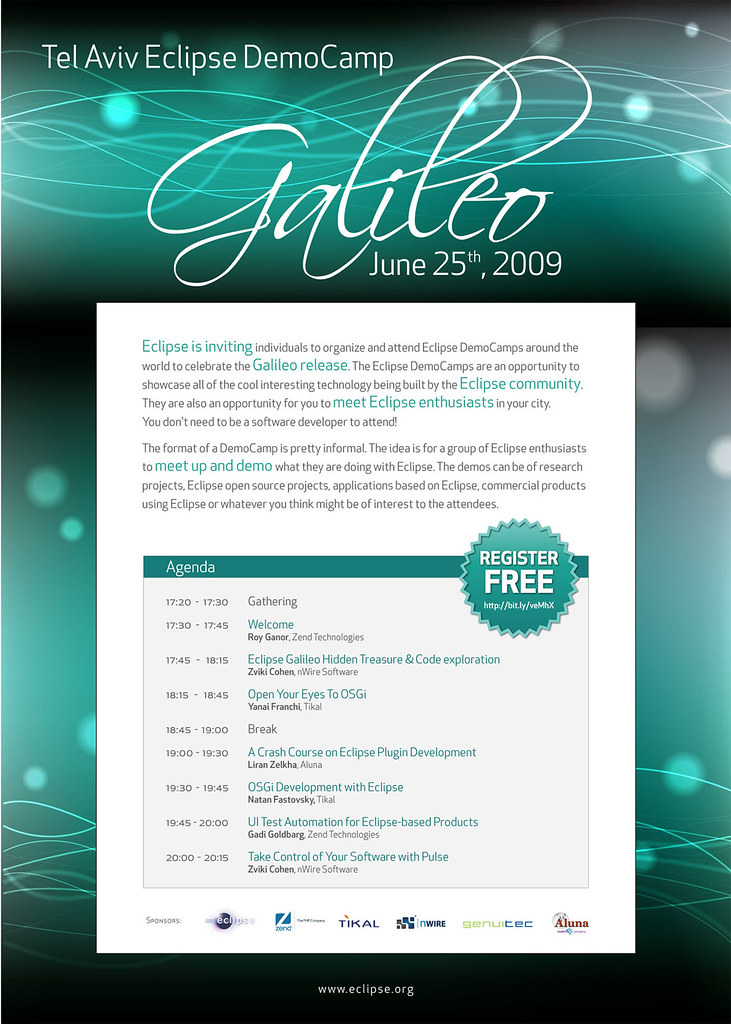
Tel Aviv Eclipse DemoCamps Galileo 2009

Its time to create a buzz around the upcoming Galileo release here in my city Tel Aviv, Israel. Actually this is the first time ever this happens in Tel Aviv, and the number of attendees is really impressive, comparing to other countries around the globe.

What is an Eclipse DemoCamp?

"We are inviting individuals to organize and attend Eclipse DemoCamps around the world to celebrate the Galileo release. The Eclipse DemoCamps are an opportunity to showcase all of the cool interesting technology being built by the Eclipse community. They are also an opportunity for you to meet Eclipse enthusiasts in your city."

What's the plan?

Six presentation given by great people who volunteered to help promoting and contributing to the event.

This time Zend Technologies (the PHP company I work for ;) and the company behind PDT) helps to organize the event.

Register free here.

Saturday, May 30, 2009

Two Horizons Coincide

In recent years there has been an explosion of open source communities in several areas within the software mainline industry. Vertical and horizontal communities are founded. While vertical communities are specialized in one sector, horizontal ones developed with vertical links.

I am always excited to see two communities that find a common interest and collaborate together. A great (yet extreme) example of vertical and horizontal communities that converge is the Eclipse/Jetty project, starting with basic integration points the two communities are now associated as Jetty’s core is hosted by the Eclipse Foundation.

Eclipse and PHP Are Now (Officially) Best Friends!

What it takes for two horizontal communities of the size of Eclipse and PHP to be "best friends"? Except of course for motivation of these communities to be improved.
  1. Recognition - The Eclipse community understands that PHP developers are major section of its user’s base, and therefore takes actions. At the very first days of Eclipse, PDT was available as a plug-in that could be installed over Eclipse platform and other dependencies. With the release of Galileo, Eclipse recognizes that people enter to the Eclipse world because of PHP and releases an Eclipse PHP flavor that is created exclusively for the PHP community, exactly as provided to Java, C++ and Web tools developers.


  2. Commitment – The two communities grow together. When one makes a move, the other takes an action as well. When PHP has made the intent to deliver its new major version, Eclipse PHP Development Tools (PDT) has been adapted by supporting the new PHP 5.3 language features with an early release. Another example, since PHP is an extensible language providing a way for developers to add extensions to its core, Eclipse PDT enables those people who extend PHP to extend it as well, with API for type inference and code completion.


  3. Adoption – According to the latest Eclipse Community Survey "Eclipse IDEs are the most popular primary development environments among respondents; Eclipse JDT (60%), Eclipse PHP Development Tools (12.6%) and C/C++ Developer Tools (6.3%)." This means that for each 5 developers that use Eclipse Java IDE, there is one Eclipse PHP developer and a half C/C++ developer. Comparing these results to the 2007 community survey where PHP was not listed among the 5 top Eclipse IDEs.


It seems that we are (close to) reaching our goals to make Eclipse and PHP best friends.